|

| |
| Audit Planner - Audit
Preparation Software
$149.95+ S&H (price will increase
February 1, 2009)
 Audit
Planner Main Screen Audit
Planner Main Screen
Select from over 1000 pre-entered questions to include on your checklists
(these questions can be customized)
Just select the desired revision of ISO-9000 (2000 or
2008) and a section of the standard
Then click 'Print Preview'
|
 Menu of Questions Menu of QuestionsAfter
selecting 'Print Preview' a menu of questions for the selected section of the standard
appears
Scroll through and decide which questions to include and exclude
To exclude a question, just deselect the button to the left of the
question
Then choose 'OK' to view the checklist
|
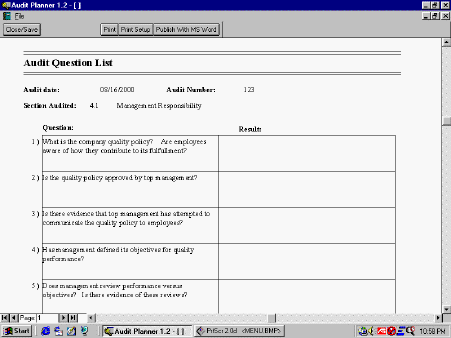 Checklist -
Fill-in-the-Blank Format Checklist -
Fill-in-the-Blank Format
This checklist format is a portrait orientation that prints the question
on the left and a blank for the audit results on the right
A particular set of questions can be named and saved for easy recall
before a future audit
|
 Checklist - Check Box
Format Checklist - Check Box
Format
This checklist format is a landscape orientation that prints the question
on the left and a blank for the audit results on the right
In the middle is four check boxes: Choose 'Not Addressed' (NA),
'practiced but no documentation' (PND), 'documentation but poor implementation' (DPI), or
'Fully Implemented' (FI)
Again, a particular set of questions can be named and saved for easy
recall before a future audit
|
 Add Question Form Add Question FormQuestions
can be added using this form for a specific revision and section of ISO-9000
Designate the question as an ISO-9000, TE-Specific, or
Customer-Specific question
After a new question is added, it will appear in the menu of questions
next time that section of the standard is selected for a checklist
|
 Add Department Form Add Department FormOptionally,
add departments to make audit planner more flexible
Type the department name and choose the applicable
revision and sections of the
standard
Once saved, a new checklist can be generated by choosing the department
from the department dropdown list on the switchboard and choosing 'Print Preview'.
The menu of questions includes all questions from each section of the
standard defined previously as applicable to that department
|
Youth New England Patriots Navy Ripped Off T-Shirt,Men's Green Bay Packers New Era Camo/Green 2015 Salute to Service On Field Cuffed Knit Hat,Toddler Green Bay Packers Green/Black T-Shirt & Hoodie Set.Arizona Cardinals White, Black and Cardinal Garter With Lace,San Francisco 49ers Women's Lateral Spirit Fleece Pants - Gray,Women's San Francisco 49ers New Era White Preferred Pick 9TWENTY Adjustable Hat Jay Cutler Jersey For Sale Cheap.Mens Washington Redskins Cutter & Buck Navy Blue Genre Polo,Mens Jacksonville Jaguars '47 Brand Black Varsity Warm Up Sweatpants,Women's Indianapolis Colts Andrew Luck Nike White Alternate Limited Jersey.Men's Detroit Lions Majestic Black Four Man Front T-Shirt,Infant Cleveland Browns Gray Horizon Bodysuit & Pant Set 2016 Chicago Bears Jimmy Clausen Jersey.boston celtics 44 ainge white swingman jerseys wholesale cheap,Women's Atlanta Falcons Nike Pink Breast Cancer Awareness V-Neck Tri-Blend T-Shirt,Men's Minnesota Vikings Pro Line Heather Grey 8-Bit Helmet Pullover Hoodie Sweatshirt Elite Bears Youth Jersey.Los Angeles Rams Real Shirt Gnome,Men's Buffalo Bills New Era Gray Team Refresher 9FIFTY Snapback Adjustable Hat,Los Angeles Rams 8"x8" White Decal Logo.Men's Dallas Cowboys New Era Gray/Camo Team Lead Original Fit 9FIFTY Adjustable Hat,Men's St Playoff Chicago Bears. Louis Rams Majestic Navy Big & Tall Critical Victory T-Shirt.Women's New England Patriots Design your Own Long Sleeve Fitted T-Shirt Slogan,New York Jets Super Bowl III Champions Commemorative On The Fifty Desk Logo,Men's Chicago Bears New Era White Block Adjustable Visor
|